AppOps Launcher – Manage Permissions Of Your Apps

Most people know that it requires a rooted smartphone to be able to change the permissions of applications. Since the recent 4.3 update of Jelly Bean, a hidden screen can do it very easily.
Normally, each application installed in your Android smartphone needs to request permissions to access certain features. As access to the Internet, user accounts,  including Gmail, the read/write on the external memory… Unfortunately, some applications are sometimes too greedy and ask too much permissions (ahem, Facebook).
However not all of them use these permissions for great reasons, with the aim of possibly obtaining a copy of your personal information/data without your agreement. A common example, a game which asks permissions to make calls or access to your contacts.
At the same time, it is not possible (not yet) to change these permissions in normal user mode. So it is therefore necessary to switch to root user (superuser) to do so, and this operation is not always successful. AppOps, a hidden screen provided by Android 4.3 scans the applications running under execution solves this problem. Its launch requires a downloadable application.
Once the application is open, all your apps are sorted by type of permission. Namely, position/user/sms-mms/device. By clicking on one of them, you can view which permissions each uses and enable or disable specific permissions easily. One downside, all permissions are not listed, but the list is modified gradually as AppOps monitors apps in real-time, so newly identified permissions are displayed progressively.
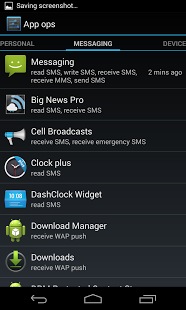
AppOps | Google Play
In these times, it would be wise to use such an application, at least if one fears for the safety of their personal data. And you? What do you think? Why not give us your thoughts below!


![The Rise Of Android [Infographic]](/wp-content/uploads/2012/12/Android-logo-252x150.png)
![[Infographic] Samsung Galaxy S4 Hidden Innovations](/wp-content/uploads/2013/04/Hidden-Innovations-S4-252x150.jpg)
![Can Google Play Beat iTunes? [Infographic]](/wp-content/uploads/2012/12/Google-Play-Logo-252x150.jpg)







![Which is Better, Android Or iPhone? [Opinion]](/wp-content/uploads/2012/09/S3vsiPhone5-252x150.jpg)