
Encrypt Specific Files & Folders With AxCrypt [Windows]

Many people use encryption on a daily basis, it’s an extremely useful tool especially when you need to transfers sensitive data over insecure means like email. There are many tools available that can encrypt portions of your hard drive, or even your whole hard drive – TrueCrypt for example.
But what if you don’t need to encrypt your whole drive, or even portions of your drive? What if you only want to encrypt specific files and folders on the fly. Well you can using AxCrypt.
AxCrypt allows you to encrypt single files or folders at the drop of a hat. It doesn’t have any kind of application that you need to run first, it all integrates into Windows through the right click menu. You can use either an encryption pass phrase or create a key file from any file you wish. With the latter, you don’t need to remember a pass phrase you just need to know which file is your keyfile.
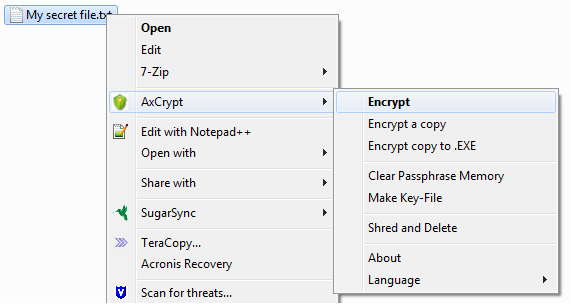
To encrypt a file all you need to do is right click on it, select the AxCrypt menu and then hit encrypt. AxCrypt will then encrypt the file or folder for you, protecting it with 128 bit encryption. Once encrypted all you need to do is double click on the file, AxCrypt will then prompt you for the pass phrase/keyfile and your file will then be opened. Once you’ve finished simply close the file and it will remain encrypted for you.
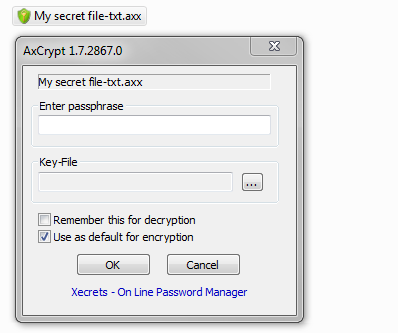
NOTE: Encrypting and decrypting large folders can take a very long time.
If you wish to transfer your encrypted files you will need to ensure that the other person has AxCrypt installed and that they know the pass phrase or have a copy of the keyfile. AxCrypt is completely free and open source, it can be downloaded using the link below.
Download AxCrypt for Windows

![How To Protect Your Computer From Infection For Free [Windows]](/wp-content/uploads/2012/09/best-anti-virus-252x150.jpg)









![WordPress Safety & Security [Infographic]](/wp-content/uploads/2013/04/WordPress-252x150.png)




-
Hung Lee
-
Mrs Lee
-
Faith Chuen
-
-
Timmy “Small Big” Huen Chi
-