
How To Disable “Internal Error” Box In Ubuntu 12.04

Ever since I upgraded to Ubuntu 12.04 LTS back in April, every now and then Ubuntu tells me that it has experienced an ‘internal error’ and asks me if I want to send an error report to Ubuntu. The exact error reads “Sorry, Ubuntu 12.04 has experienced an internal error. If you notice further problems, try restarting your computer.”

But that’s the funny thing, I never experience any problems with Ubuntu apart from this very annoying window every now and then. So, I just ignore it and choose not to sent the report to Ubuntu. I’ve done some research in how to stop this window occurring and I found that the problem is being caused by “Apport” crashing. Which in itself is an application to help log an report on errors and system crashes on unstable releases (alpha’s & beta’s etc). I’ve found out how to disable this and since carrying out this ‘fix’ I haven’t had a single repeat. So here’s how to do it:
First of all you need to paste the following command into terminal and enter your password.
gksu gedit /etc/default/apport
Now Ubuntu will open the Apport config file in your text editor. It should look like this:
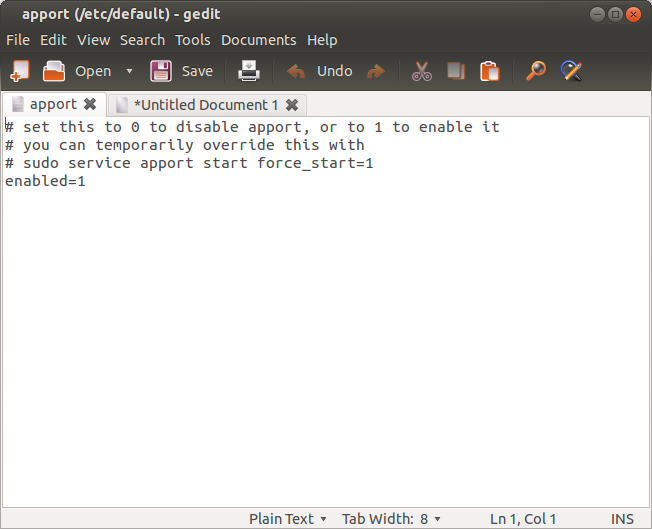
All you need to do is change the bottom row of text from “enabled=1″ to “enabled=0″. Save the config file and exit your text editor & terminal. That’s it! You’ve just disabled Apport and won’t receive anymore of the annoying “internal error” windows.
[box type="note"]NOTE: It’s perfectly safe to disable Apport as according to their wiki, it should be disabled by default in stable releases anyway.[/box]











![Half-Life & Counter-Strike Now Available On Linux [Beta]](/wp-content/uploads/2012/07/Steam_Logo-252x150.png)








-
shadowguy14
-
https://refu-archive.kevquirk.com/ Kev Quirk
-
-
Ian