
How To Secure & Protect Your WordPress Site

Contents
WordPress is a CMS (Content Management System) that is used by millions of websites and blogs all over the world such as CNN, NY Times, OMG! Ubuntu! and of course RefuGeeks. With so much time and effort going into managing a website or blog, especially when it’s done by one main person like myself for RefuGeeks or Joey Sneddon at OMG! Ubuntu! it’s extremely important to protect your assets.
There are three main things that I feel are important to protect your WordPress site against. They are data loss, hackers and spam. There are many ways to protect against these three ‘problems’, I’ve found a way that works for me so in the spirit of ‘Opensourceness’ I decided to share them with you guys.
Data Loss
Imagine the scenario, you’re making some changes to the code on your site and you delete and important file like stylesheet.php by accident. Or your web hosts have a catastrophic outage and lose all of your data (unlikely but not impossible). Or your site or web hosts get hacked and your data gets deleted.
Any of these scenarios plus a thousand more could happen at any time which would result in your WordPress site being at best damaged and at worst completely ruined or deleted. If this kind of thing was to happen it’s almost impossible to prevent so the only way to protect your data is to backup, backup again and finally BACKUP AGAIN!
My web hosts run weekly backups automatically – that’s great but I don’t want to just rely on a weekly backup that someone else is running. I take matters into my own hands and run manual backups using a free plugin called Online Backup for WordPress. You can use this to generate regular backups automatically which can then be downloaded for offline storage or uploaded to there paid for cloud storage solution (you get 100MB for free).
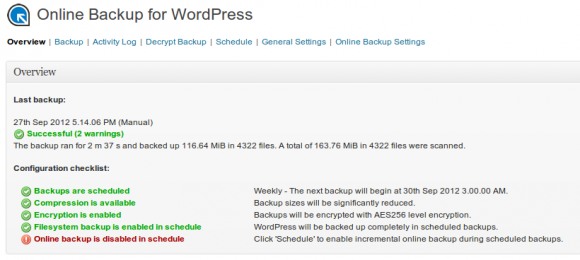
I have RefuGeeks setup to backup once a week and then email the results to me so that I can download the encrypted backup file to my machine. I then delete it from my web host so as not to take up space on there. Once the WordPress backup is on my machine I then move it to my Dropbox folder so that it is synced to the cloud (I only keep my two most recent backups in Dropbox) and I also copy it to a 1TB USB hard drive that I have at home.
This means that I have my live WordPress site, a weekly backup from my hosts and also a weekly backup of all my data (database and files) stored in two different locations. I also run a manual backup whenever the feeling takes me, usually after a big article like this. So, even if my hosts got hacked, all my data was deleted and my house burnt down, my WordPress site is still safe…let’s hope that doesn’t happen though.
Hackers
As mentioned above, it’s pretty much impossible to completely stop someone hacking your WordPress site and/or web host but there are ways to make it extremely difficult for a hacker to gain entry to WordPress. Here’s how I do it…
I have numerous, amazing guest authors here on RefuGeeks, all of which have their own account to logon and submit articles for publication. Unfortunately I can’t control what passwords the guests use (although I am working on it) so they could have a completely insecure password. So, to get around this all my guests have a very restricted Contributor account in WordPress.
A WordPress Contributor account only allows users to write and manage their own posts, but not publish anything. This means that even if a password is insecure and a guest account gets hacked then a hacker can only submit an article for me to read and that’s it – pretty useless by hacking standard.
I’d like to stress that I don’t do this because I don’t trust the guest Authors on RefuGeeks. I do this because I don’t trust the Internet. If I could get them all administrator accounts and ensure that RefuGeeks is completely secure then I would.
Obviously I have an administrators account on RefuGeeks and it’s the only one, so I keep it very secure. First of all the password is 40 characters long and very, very complicated. Secondly I have 2-factor authentication enabled on my account by way of Google Authenticator. What Google Authenticator does is ask for a six digit generated code from an app on your phone which changes every 30 seconds. Without this code you won’t be able to log in. So effectively my password changes every 30 seconds.
So, for someone to get admin access to my WordPress environment they need my user name (which is also cryptic), my extremely long & complicated password and also my phone (which is also password protected for use). So I think it’s safe to say that my WordPress admin account is pretty secure.
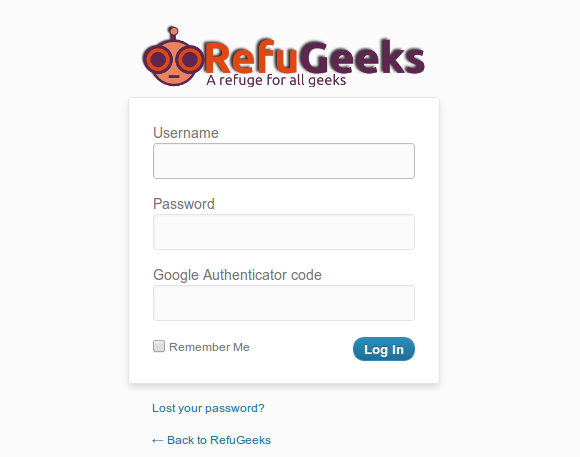
To enable Google Authenticator on your WordPress site, all you need to do is install the Google Authenticator plugin for WordPress. It’s free and very simple to setup. Once enabled you can select which users require Google authentication from the users menu. So simple yet so secure.
Spam
The last of the three ‘problems’ that I protect WordPress against is spam, whilst not malicious it can be very annoying and make your site look very unprofessional. As with hacking it’s almost impossible to completely prevent spam but I use two plugins that significantly reduce it. They are Disqus and Akismet.
Disqus is free and is used by thousands of sites all over the world. It ties in with numerous providers like Google and Facebook so you can use your social accounts to login and post comments. Disqus also have there own anti-spam filtering in order to prevent spam. If a comment gets marked as spam then you, as the WordPress administrator or Disqus moderator have to approve the comment before it’s published – you can also set this on all comments if you like.
Akismet is also very widely used spam filtering plugin that is used all over the world by WordPress users. It’s free for personal blogs, but you can make a donation. I emailed the support guys at Akismet to see which ‘contract’ I should take and they said RefuGeeks qualifies for the personal account so it’s free. I decided to make regular donations though in order to help the project.
Like the Disqus spam filtering, Akismet also checks comments for spam and flags them for approval if it thinks a comment is spam. Akismet works with a number of commenting systems including Disqus and the default WordPress commenting system. It’s a great system and this coupled with the Disqus spam filtering means that I am yet to see a spam comment slip through the net and be published on RefuGeeks.
Conclusion
WordPress is an amazingly powerful tool but like anything that is on the internet it needs protection. With some simple additions to WordPress and some lateral thinking, you can also ensure that your WordPress site is as protected as it can be.
Do you use a different method of securing or protecting your WordPress site? Or have I missed something? Tell us more in the comments section…

![WordPress Safety & Security [Infographic]](/wp-content/uploads/2013/04/WordPress-252x150.png)


![Encrypt Specific Files & Folders With AxCrypt [Windows]](/wp-content/uploads/2012/12/AxCrypt-Logo-252x150.png)
















Pingback: UpDraftPlus - The Best Backup Plugin For Your Wordpress Site | RefuGeeks
Pingback: Google Launches New Site To Assist Hacked Website Owners | RefuGeeks