
How To Take Screenshots On The Nexus7

Yesterday I received my pre-ordered Nexus7 in the post and I love it (review coming soon). I wanted to share screenshots of my new toy on Google+ without having to root the device.
After a lot of research, I finally found the answer on how to do it. The best news is that you don’t even need an app as Android 4.1 Jelly Bean can do it natively.
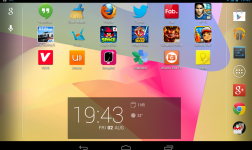
To take a Screenshot, all you need to do is hold the volume down and power buttons at the same time. After a second or so you will see your screenshot be taken and the Android gallery will open up. Here is a screenshot of my Nexus7:

I don’t know if this is a new feature to Jelly Bean but my mobile phone is Gingerbread and the same command doesn’t work on that. Try it on your device and let us know in the comments section…


![Can Google Play Beat iTunes? [Infographic]](/wp-content/uploads/2012/12/Google-Play-Logo-252x150.jpg)



![[Infographic] The History Of Android](/wp-content/uploads/2012/12/Android-logo-252x150.png)










-
mactopics
-
https://refu-archive.kevquirk.com/ Kev Quirk
-
http://twitter.com/mactopics Mactopics.de
-
-
-
alianna