
How To Try Firefox OS In Linux

 Firefox OS, codenamed ‘Boot 2 Gecko’ is a fully web-based mobile OS that Mozilla hope will take the smart phone market by storm. This of it like ChromeOS for your phone.Having Linux underneath (like Android), Firefox OS will support all of the good stuff you have become accustomed to in your smart phones including open HTML5 web apps (again, like Chrome).Firefox are releasing daily builds at the moment. If you are one of the great Linux users in the world, you can give Firefox OS a whirl on your computer! Here’s how:
- Download latest Firefox OS build from here.
- Extract it to get a b2g folder.
- Run the following commands to install Gaia and make a new profile:
-
git clone git://github.com/mozilla-b2g/gaia
-
make -C gaia profile
- Finally, to run Firefox OS, execute:
-
/path/to/your/b2gfolder/b2g -profile gaia/profile
[box type="alert"]These builds are experimental and meant only for developers, so use them at your own risk.[/box]
Here are some screen shots of Firefox OS for you to take a sneaky peak at:
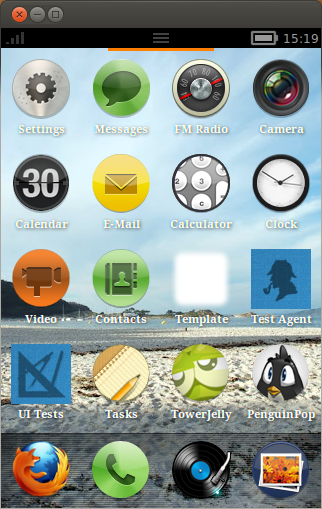
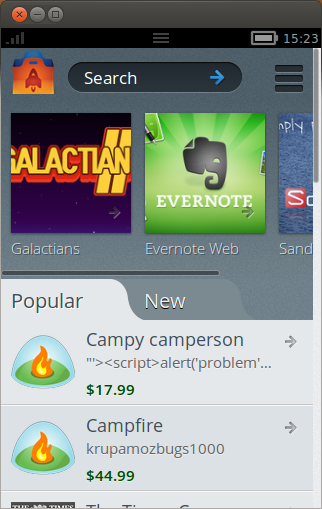

I’m personally in two minds about Firefox OS. On the one hand I think it has no chance to even put a chink in the armour of iOS & Android, but on the other hand, Mozilla initially plane to launch Firefox OS devices in developing countries like parts of South America were iOS & Android are far less prevalent. This may well prove to be a stroke of genius – only time will tell.
What do you guys think? Would you give up your smart phone for a Firefox OS device?









![Half-Life & Counter-Strike Now Available On Linux [Beta]](/wp-content/uploads/2012/07/Steam_Logo-252x150.png)







Pingback: Get To Know Firefox OS With "Build Firefox OS" (Website) | RefuGeeks()
Pingback: Get To Know Firefox OS With "Building Firefox OS" (Website) | RefuGeeks()