
How To Use Google+ Comments On WordPress

 This article is over six months old. Which means the information below may be out of date. Please keep this in mind whilst reading this article.
 A couple of weeks ago Google announced that they are enabling Google+ comments in their blogging platform, Blogger. This is great news for those with a blog on Blogger, but what about us WordPress users? Well, devops extraordinare Brandon Holtsclaw has come to our rescue with Google+ Comments for WordPress.
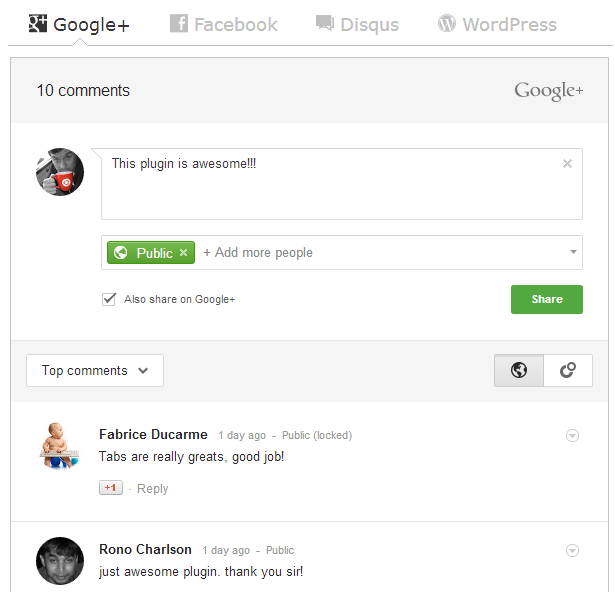 There have been a raft of Google+ Commenting plugins on WordPress.org, but ironically most of them are based on Brandon’s source code as he’s released the plugins source code.
The thing is though, Google+ Comments for WordPress takes it one step further. Not only can you have Google+ comments, but Brandon has also added the ability to use different commenting systems in a tabulated format. Google+, Facebook, Disqus, and the default WordPress commenting system are all supported.
What’s more, you can enable and disable the different commenting systems from within the settings menu. I had a chat with Brandon earlier on today and he confirmed that he still has a lot of plans for Google+ Comments for WordPress, including the ability to pick the default tab that’s displayed.
If you want to see Google+ Comments for WordPress in action, then all you need to do is look below because we’re now using it here on RefuGeeks. However, for more in-depth news on the Google+ for WordPress plugin, then head over to the plugins home page on CloudHero where Brandon will be sure to keep you all fully up to date on the latest news.






































-
http://www.linuxrants.com Linux Rants
-
http://www.brandonholtsclaw.com/ Brandon Holtsclaw
-
http://www.linuxrants.com Linux Rants
-
-


