
Make Your Battery Last Longer In Ubuntu With Jupiter

Now I don’t know about you guys, but I like to run on my battery as much as possible – mainly because I usually end up entangled in my power cable when I’m plugged in. On my main laptop I have a 6 cell battery that usually lasts around 6 or so hours under normal use. This is great but doesn’t quite last a full working day when I’m out and about.
Enter Jupiter…
Once installed, Jupiter sits in your system tray on the top panel and happily helps conserve your power silently. It has three ‘profiles’ that it can use, Maximum Performance, Power On Demand & Power Saving. When your computer is plugged in, Jupiter will default to ‘Maximum Performance’ – this basically means that your computer is acting as normal and that there are no power saving measures in place. Unplug your cable and Jupiter will immediately switch to ‘Power Saving’ mode.

Jupiter saves power by removing resources from high foot print devices like your CPU and then diverting power back only when it is required. I’ve been running Jupiter for around a week or so now and I have seen around a 15-20% improvement in my battery life – this is pretty awesome and gets me close to that 8 hour battery life mark for a full working days use.
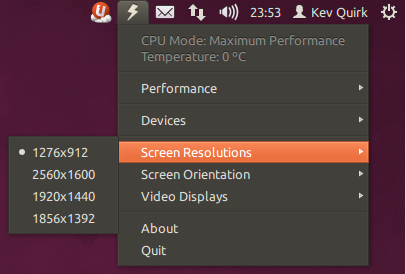
Jupiter doesn’t stop there though, oh no there’s more! It will also let you disable things like Bluetooth, Wi-Fi & your trackpad in order to save battery life on demand. It also allows you to quickly change the screen resolution and disable external displays with a couple of clicks. This can really give your battery precious minutes when it counts.
All in all I can’t recommend Jupiter highly enough. If you want to give it a try then simply run the terminal commands below and don’t forget to tell us how much it improves your battery life!
sudo apt-add-repository ppa:webupd8team/jupiter
sudo apt-get update
sudo apt-get install jupiter
