
Referrer spam in your analytics

Contents
- 1INTRODUCING, THE SEMALT BLOCKER (redirector)!
- 1.1Where to download the Semalt Referrer Blocker
- 1.2Where Should I redirect Semalt?
- 1.3About FireCask
- 2Understanding Referer Spam and How to Deal with it
- 2.1What is a referrer?
- 2.2What is referrer spam?
- 2.3Does referrer spam work?
- 2.4Who are the spammers?
- 2.5How do I know I’m being targeted?
- 2.6Can’t I just ignore it?
- 3Hiding referrer spam in Google Analytics
Referrer spam is a nuisance – it skews your website stats so that you can no longer see accurate useful information such as how many people are visiting your site, where your visitors are located, how long they have spent on a particular page and what technology they are using. It also has the potential to harm your rankings in Google’s search engine results pages (SERPs).
INTRODUCING, THE SEMALT BLOCKER (redirector)!

Basically, if you are running your site on wordpress, then this plugin is for you! The guys at Firecask were good enough to dev this simple plugin that would redirect Semalt traffic away from your site to wherever you choose!
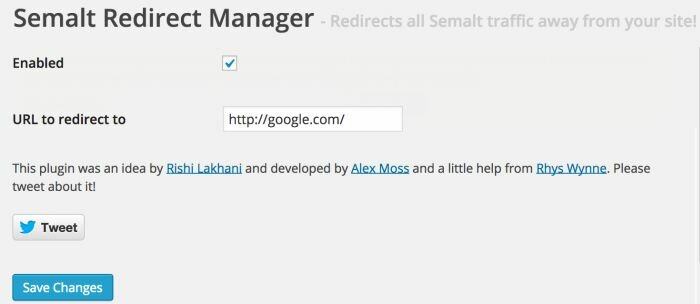
Where to download the Semalt Referrer Blocker
On the word press Repository: https://wordpress.org/plugins/semalt/
On the Firecask Semalt Page: http://peadig.com/wordpress-plugins/semalt-blocker/
Oh and if you liked this plugin – please give it a 5 star review :) https://wordpress.org/support/view/plugin-reviews/semalt?filter=5
Where Should I redirect Semalt?
Well, we have left that to your imagination, but I particularly like David;s idea:
Having problems with Semalt messing with your Analytics? Click on this link: http://t.co/HWBPiNHdGd
— David Sottimano (@dsottimano) November 12, 2014
About FireCask
FireCask is a digital marketing and web development company based in Manchester city centre. Specialising in online marketing and SEO, creative content and WordPress development, their clients include Expedia, 123Reg and The Poke. Alex has also developed several plugins with over 750,000 downloads and is also Co-Founder of Peadig, a WordPress theme framework powered by Bootstrap.
The rest of the article looks at what referrer spam is, and how you can prevent it from distorting your reported data in Google Analytics.
Understanding Referer Spam and How to Deal with it
What is a referrer?
The HTTP referrer is a HTTP header field that is sent when a browser goes from one page to another. When a user clicks a link, the user’s browser makes a request to the server that holds the desired web page. That request includes the HTTP referrer field, which identifies the last page that the user was on when they clicked the link.
This information is useful for website owners because it allows them to see where their traffic originates from. You can either view the data in your server web logs or with a service like Google Analytics:
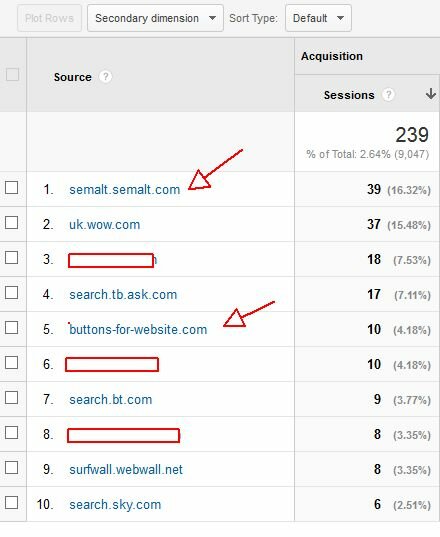
(I have blocked out a few site – and pointed to the two biggest annoyances currently via referral spam.)
What is referrer spam?
The HTTP referrer can be left blank or changed to anything at all. Consequently it is abused by spammers who change the referrer URL to that of a web page they want to promote. This can be used to their advantage in two ways.
Firstly, the spammer visits hundreds or thousands of websites on the web (usually via an automated script) with the fake referrer URL, making repeated requests to each site. The website owner sees a surge in traffic from the fake URL in their logs or analytics and, thinking it must be important, visits the fake URL to check it out. This gets more traffic for the promoted URL.
The second way takes advantage of a habit that many bloggers have of publishing on their website a list of recent referrers, with a link back to the referring page. Supposedly the idea here was for bloggers to link to those linking to them, thereby ‘broadening the conversation’. Instead, the result has been a huge growth in the amount of referrer spam as spammers take advantage of an easy link back to any webpage they want to promote.
Does referrer spam work?
Referrer spam certainly has the potential to generate some traffic. This comes from unsuspecting website owners checking out the source of surges in visits to their sites, although you might question how many of those actually convert into sales.
So what about the easy links that referrer spam generates? For those unfamiliar with search engine optimisation, the theory is that a lot of links can help boost a web page’s rankings in the SERPs. But nowadays, it is generally the quality and relevance of the links that stands to impact a site’s rankings – at least in the long run. Links built through referrer spam might at best give a web page a short term boost in the SERPs (usually followed by a Google penalty) but are unlikely to be of any benefit in the long run. Sadly this hasn’t deterred the spammers from their efforts.
Who are the spammers?
There are literally thousands of spam bots out there crawling the web in search of websites that are vulnerable to referrer spam and sending fake requests when a vulnerable website is found.
One of the biggest culprits is ‘Semalt’, which claims to be an ‘SEO tool’. Semalt’s website describes it as:
“a professional webmaster analytics tool that opens the door to new opportunities for the market monitoring, yours and your competitors’ positions tracking and comprehensible analytics business information”.
However, unlike other regular analytics and stats tools, Semalt sends their crawler to websites as a referrer rather than as a standard bot, which suggests straight away that something is amiss. Semalt’s website claims its bots makes visits in order to gather statistical data for their service. But if that was all the bot did, there would be no need to send it as a referrer, or to “simulate real user behavior: unique IP, browser, display resolution etc” as its website claims. Standard bots like Google and Bing don’t come in this way, and don’t therefore affect your website stats.
Security experts Incapsula report that Semalt’s bot uses a QtWebKit browser engine which allows it to avoid common bot detection methods. It can also execute JavaScript and hold cookies, allowing it to bypass bot filters that are challenge-based (such as asking the bot to parse JavaScript). Its ability to execute JavaScript also means that its visits are reported by Google Analytics as ‘human traffic’. All of this would be completely unnecessary if Semalt was merely gathering data in the same way other SEO tools do. Semalt also completely ignores any directives in your robots.txt file – a small file you can place on your server which instructs some or all bots not to crawl some or all parts of your website. Again, other (reputable) bots and crawlers respect robots.txt.
This all wouldn’t be such an issue if Semalt’s traffic wasn’t so prolific – its bots inundate websites with a flood of requests. This means that everything is skewed to a significant degree, from visitor numbers to demographics, and it can cause sudden unexplained spikes in traffic that can be difficult to understand. Incapsula believe that there is sufficient evidence to show that Semalt is using a botnet that has been generated by malware which is hidden in a utility named ‘Soundfrost’. Making use of this utility, they believe Semalt has infected hundreds of thousands of computers in order to create a giant botnet which has been incorporated into the Semalt referrer spam campaign. This gives it the ability to send huge floods of traffic. So why do it?
Semalt’s referral URLs take you to their main web page which invites you to try their software free for seven days. So far from merely collecting stats for its software users, Semalt is without doubt using referrer spam to promote its software. Some of its subdomains such as kambasoft and savetubevideo also use referrer URLS that take you to random websites, perhaps employing referrer spam as a basic way to drive traffic, although the reason why is unclear.
Semalt does have the facility on its website to remove your site from the list of sites that it visits. However, it is not advised that you try this – there are plenty of accounts from people on the web who have sent a removal request, only to find that the Semalt referrer spam gets much, much worse.
How do I know I’m being targeted?
Sometimes you’ll know you’ve been targeted by referrer spam because the referrers will show up in your Google Analytics list. You can then filter these from showing in Google Analytics, which I’ll explain how to do later.
Other times, you’ll get a surge in direct traffic for no apparent reason. Unless you’ve been doing some serious offline marketing, there’s a good chance this is also referrer spam. This article by Dave Buesing is helpful in weeding out the source of the spam where it is showing up as direct traffic: http://davebuesing.com/google-analytics-spam-traffic-bots/
If you do identify a URL that is sending you referrer spam, don’t visit it. It’s spam and it doesn’t deserve your time – and there’s a reasonable chance you’ll land on a website riddled with viruses and malware.
Can’t I just ignore it?
Referrer spam has a number of possible negative effects and shouldn’t therefore be ignored.
First, if your website is linking out to the URLs that the spammers are promoting, it is possible that it may be demoted in the SERPs, or even removed. You’ll be inadvertently creating a lot of links to websites that promote products and services from the shadier side of the web like Viagra pills – which can make your website look spammy. Those sites using referrer spam to promote themselves are often penalised by Google, and chances are, Google will re-evaluate the sites linking to them as well. If you do nothing else, you need to make sure you’re not displaying a list of referers on your website.
Second, as mentioned at the start, referrer spam messes up your website analytics, making it difficult to know how well your website is performing. This is especially tru when you get a high volume of referral spam – it could hurt your conversion rates, and mess up your reporting if you dont realise you have referral spam. Fortunately, you can make some tweaks to Google Analytics to filter out the referrer spam from your results.
Hiding referrer spam in Google Analytics
The easiest way to stop referer spam from affecting your statistics in Analytics is to add the offending referer to your ‘Referral Exclusion List’.
As an example, we’ll set this up for semalt.com.
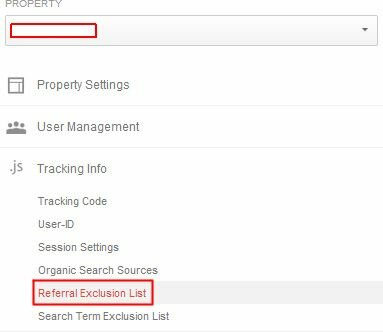
In Google Analytics, click Admin and then select ‘.js Tracking Info’ and ‘Referral Exclusion List’:
Then click ‘Add referral exclusion’:
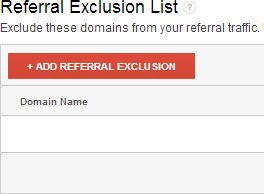
Enter the domain to exclude in the box (e.g. semalt.com) and click Create:
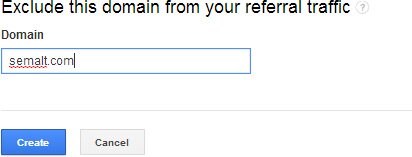
This will filter out any visits from your stats that are from semalt.com and from any subdomain, e.g. somesubdomain.semalt.com. It won’t, of course, block the bots from visiting your website altogether – to do this, you’ll need to make some changes to your htaccess file as suggested in this article by Jan Kerney: http://www.mylocalbusinessonline.co.uk/semalt-referral-spam-shady-tactics/
Or alternatively use this handy SEmalt plugin :)

Pingback: SearchCap: Firefox Picks Yahoo, Apple Maps Partners & Bing Home Page HD()
Pingback: Oh Semalt. What are you doing now? | Quumf()
Pingback: Semalt Referral Spam and Shady Tactics | My Local Business Online()
Pingback: How to block SEMalt in nginx and get your own back (a bit) - rob hammond()
Pingback: Stop, Block, & Ban Referrer Spam - STRYDE()
Pingback: How To Stop Referrer Spam()
Pingback: Stop, Block, & Ban Referrer Spam()